


InterBase and Firebird Developer’s manual for Visual Studio Net. Part 1. Introduction to ADO.NET
What is an OLE DB Provider?
Several ways of connecting to the InterBase and Firebird database
Storing the connection strings
Encrypting the connection string. Data Protection API
ExecuteReader
ExecuteNonQuery
Command parameters
Calling stored procedures
Working with arrays
Working with BLOB fields
MARS — Multiple Active Result Sets
Transaction isolation levels in Firebird, InterBase
Nested transactions in Firebird, InterBase
TransactionScope and distributed transactions in .NET 2.0 or above
Controlling Firebird, InterBase transactions via SQL
Using Transaction Savepoints
OLE DB object properties — OleDbProperties .Net
Connection pool
Unconnected model. DataSet
Introduction
In this article i shall describe one of the methods of working with Firebird and InterBase databases via OLE DB provider in the .NET environment.
InterBase and Firebird SQL servers can be used in applications of different sizes and aimed for different approaches — from single-user desktop applications with embedded databases, to corporate client-server applications.
The following tools will be used in this article:
- ADO .Net 2.0
- Data Protection API (DAPI).
- Visual Studio 2005 (2008) Professional.
- Firebird SQL Server 2.0. Any other InterBase or Firebird version can be used too.
- IBProvider Professional Edition.
What is an OLE DB Provider?
OLE DB Providers are used for access to databases via OLE DB interfaces. They can be used in many client libraries, for example: ADO, dbGo (ADO Express), ADO .Net, and etc.
For further details read the article: Firebird ODBC driver, InterBase ODBC or OLE DB?
For Firebird and InterBase access IBProvider can be used. IBProvider is aware of about 19 database server types including Firebird 3.0 and InterBase XE7 It is automatically setup own core when client connect to a server. Furthermore, OLE DB standard allows using IBProvider like the Firebird .Net Provider and InterBase .Net provider through the System.Data.OleDb namespace.
Perhaps, IBProvider is the most universal driver among InterBase and Firebird components. Besides ADO .Net, you can use it in the script automation (VBScript, Java Script), also for interaction with Microsoft Office, connect Firebird and InterBase databases to the MS SQL Linked Server and develop Business Intelligence (BI) processes.
Standard data access interfaces provide the best compatible and universal database development.
For execute article examples you need to download and install IBProvider Professional Edition.
Several ways of connecting to the database
Parameters of the connection string for Firebird, InterBase
Controlling connections to OLE DB sources is accomplished via the OleDbConnection class. The simplest way to connect to the InterBase and Firebird DB — is to specify the connection string in the constructor of this class:
OleDbConnection con = new OleDbConnection(connectionString);
con.Open();
con.Close();
|
NET 2.0 has a new OleDbConnectionStringBuilder class for building the connection string:
OleDbConnectionStringBuilder cb = new OleDbConnectionStringBuilder(); cb.Provider = «LCPI.IBProvider»; cb.Add(«Location»,@»localhost:d:\Program Files\Firebird\examples\EMPLOYEE.FDB»); cb.Add(«User ID», «sysdba»); cb.Add(«Password», «masterkey»); cb.Add(«ctype», «win1251»); Console.WriteLine(cb.ToString()) |
IBProvider has some initialization variables which must be specified prior for connecting to Firebird (InterBase):
| Property | Description |
| Location | Path to the Database’s server. |
| Provider | Name of OLE DB provider |
| User ID | Username |
| Password | User password |
| Ctype | Encoding defines symbols of which alphabet will be used for encoding of the fetched data. |
| Property | Description |
| Data Source | This parameter is used for defining a user friendly name for the DB, for example «Employee DB». If the Location parameter isn’t specified, then it’s assumed that the Data Source parameter points to the DB’s location. |
| db_client_type | DB server’s client type. Exists only in IBProvider v3. |
| db_client_library | DLL containing server’s client |
| auto_commit | Automatic transaction confirmation mode. In order to activate it, you must define «auto_commit=true» in the initialization string. |
| role | User’s role. |
For further details see Additional information about IBProvider initialization properties.
Always define the DB server’s name in the Location parameter. This way, you’ll save backward compatibility with all previous Firebird and InterBase versions.
Storing the connection strings
Usually connection strings aren’t hard-coded in production applications. It’s more efficient to specify them in the application settings (Settings technology), or specify them in a separate configuration file.
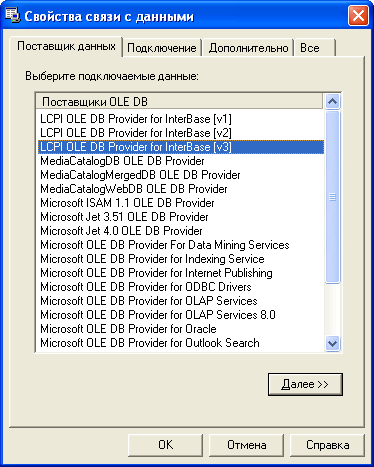
In MS Windows connection parameters are stored in files called Microsoft Data Link; with special extensions — .udl. The universal connection strings editor is also associated with them. IBProvider supports tabs which are part of a user-friendly interface for specifying all connection and initialization parameters. If you want to use the .udl file for storing connection parameter in you application, follow these steps:
- Create an empty file with an .udl extension.
- Open the file. You’ll see a special setup wizard.
- Choose IBProvider v3 from the OLE DB providers list.
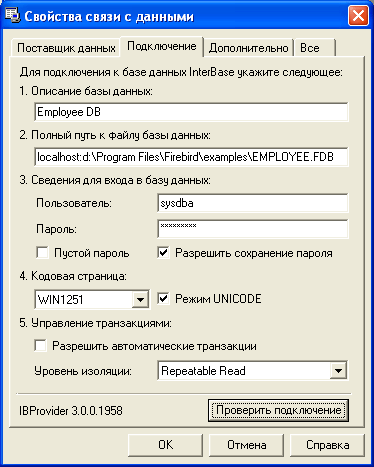
- Define your parameters as shown on the picture and click the «Check connection» button.
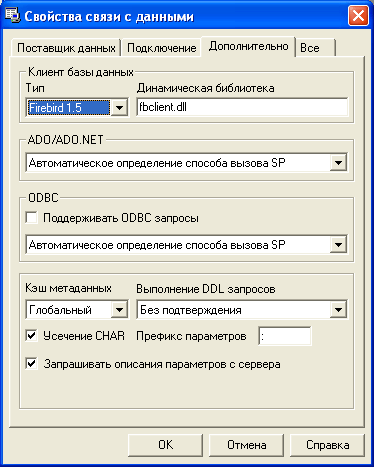
- In the Advanced tab you can specify additional connection parameters.
- Click «OK» to save the information into the initialization file.
In order to use the created .udl file directly or through OleDbConnectionStringBuilder, specify its name in the File Name property.
OleDbConnectionStringBuilder cb = new OleDbConnectionStringBuilder(); cb.FileName = AppDomain.CurrentDomain.BaseDirectory + @»\employee.udl»; OleDbConnection con = new OleDbConnection(cb.ToString()); con.Open(); |
The Second way — Placing the connection string into the configuration file::
Select the Settings tab in the project’s properties and create a new property type (Connection string) named ConnectionString:

When editing its properties, VS 2005’s built-in connection string editor will launch automatically:
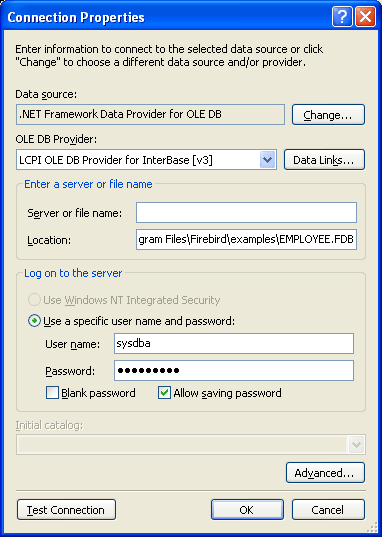
You can access the Microsoft Data Link configuration wizard simply by clicking the «Data Links» button.
To read the connection string from the configuration file we need to create an instance of your application’s configuration class:
Properties.Settings s = new Properties.Settings(); //read ConnectionString from app.Settings Console.WriteLine(s.ConnectionString); |
You can use the ConnectionProvider class, which was made to make your life easier (e.g. it encapsulates all described connection methods).
Encrypting the connection string. Data Protection API.
One of the ways to protect your connection string stored in the configuration file — is to use the Data Protection API (DAPI). In Windows 2000 and later DAPI is a part of the operating system. For example, we need to encrypt data stored in the connectionStrings section. To achieve this we will use the DataProtectionConfigurationProvider class. Now we add the System.Configuration.dll assembly to our project and use the following code:
public void DataProtectionAPITest() { // Description: DATA PROTECTION API, encrypting connection string, ADO .Net provider try { //open App.config connectionStrings section Configuration config = ConfigurationManager.OpenExeConfiguration( System.Reflection.Assembly.GetExecutingAssembly().Location); ConnectionStringsSection section = config.GetSection(«connectionStrings») as ConnectionStringsSection; if (!section.SectionInformation.IsProtected) { // perform encription section.SectionInformation.ProtectSection( «DataProtectionConfigurationProvider»); // save configuration config.Save(); } } catch (Exception ex) { Console.WriteLine(ex.Message); } // read connection string from encrypted section Console.WriteLine(Properties.Settings.Default.ConnectionString); } |
Be careful when encrypting your configuration file. Data encrypted in its sections can be decrypted only on the computer where it was encrypted. So, try to run this procedure at the end-user’s pc.
This example suits our needs perfectly. During application’s installation, we simply place App.Config File not yet encrypted. This procedure will encrypt the file at application’s first run, so the application will work with the encrypted file subsequently. FYI, the encryption procedure can also be launched during the application’s installation.
Unfortunately, there are no standard ways of protecting the .udl files, so it would be more security-wise to store the initialization strings in a configuration file.
Using Commands
Commands are designed for transferring queries to the DB. OLE DB providers interact via the OleDbCommand object. Commands are always executed for the currently open DB connection within a transaction.
The following actions must be done, in order to query a DB:
- Create a DB connection and open it.
- Create an active transaction within the current connection using the OleDbConnection.BeginTransaction() method.
- Create an OleDbCommand object using either one of the overloaded constructors or the OleDbConnection.CreateCommand() method.
- If the Transaction property haven’t been defined in the constructor, define it.
- Set CommandText property.
- Call one of three DB request methods — ExecuteScalar, ExecuteReader and ExecuteNonQuery
- Finish the transaction using OleDbTransaction.Commit() or rollback with the OleDbTransaction.Rollback() method and close the connection.
ExecuteScalar
Returns first value of the first column. Other values ignored. Used for count, argegate queries which retunrs single value:
public void ExecuteScalarTest() { //Description: ExecuteScalar — gets a single value. Firebird, InterBase .Net provider (c#) OleDbConnection con = ConnectionProvider.CreateConnection(); con.Open(); OleDbTransaction trans = con.BeginTransaction(); OleDbCommand cmd = new OleDbCommand(«select count(*) from employee», con, trans); Console.WriteLine(«Record count:» + cmd.ExecuteScalar().ToString()); trans.Commit(); con.Close(); } |
ExecuteReader
This method returns an OleDbDataReader object which is pretty much similar to the Recordset object in classic ADO. It uses undirectional ForwardOnly data reading via the connected access model. So, if you want to use this method, you will need to open a DB connection.
Browsing through the result set is accomplished by using the Read() method, which returns true if there are rows left or false in any other case. However, when executing the ExecuteReader() command, the created by it OleDbDataReader isn’t positioned on the returned result set’s first row, so you will need to execute the Read() method to read it.
Although this doesn’t seem very friendly, there is a convenient way of reading data from the returned result set — using the Read() method together with the while construction:
public void ExecuteReaderTest() { //Example: ExecuteReader using Firebird an InterBase oledb driver; connect InterBase c# OleDbConnection con = ConnectionProvider.CreateConnection(); con.Open(); //Create command OleDbCommand cmd = con.CreateCommand(); cmd.Transaction = con.BeginTransaction(); cmd.CommandText = «select * from employee»; OleDbDataReader rdr = cmd.ExecuteReader(CommandBehavior.CloseConnection); //read data while (rdr.Read()) { string tmp =«»; for(int i=0; i<rdr.FieldCount -1;i++) { if (tmp != «») tmp += «\t»; tmp += rdr[i].ToString(); } Console.WriteLine(tmp); } rdr.Close(); //after calling OleDbDataReader.Close() connection will be closed too Assert.AreEqual(ConnectionState.Closed,con.State); } |
Keep in mind that after executing the OleDbDataReader.Close() method, the DB connection will close. This is because we used an overloaded ExecuteReader() method with a defined CommandBehavior.CloseConnection parameter. By default, after executing the OleDbDataReader.Close() method, the DB connection stays open.
ExecuteNonQuery
This method is used for queries which return affected record, like insert, update, delete, as well as for executing stored procedures, results of which are passed to the command’s OUT parameter:
public void ExecuteNonQueryTest() { //Example: Run ExecuteNonQuery using Firebird OLE DB driver and .Net provider (c#) OleDbConnection con = ConnectionProvider.CreateConnection(); con.Open(); OleDbTransaction trans = con.BeginTransaction(); //INSERT OleDbCommand cmd = new OleDbCommand( «insert into country (country,currency) values(:country,:currency) «, con, trans); cmd.Parameters.AddWithValue(«country», «Russia»); cmd.Parameters.AddWithValue(«currency», «Kopec»); //records affected Assert.AreEqual(1, cmd.ExecuteNonQuery()); //UPDATE cmd = new OleDbCommand( «update country set currency=:currency where country =:country», con, trans); cmd.Parameters.AddWithValue(«currency», «Rouble»); cmd.Parameters.AddWithValue(«country», «Russia»); //records affected Assert.AreEqual(1, cmd.ExecuteNonQuery()); //DELETE cmd = new OleDbCommand( «delete from country where country =:country», con, trans); cmd.Parameters.AddWithValue(«country», «Russia»); //records affected Assert.AreEqual(1, cmd.ExecuteNonQuery()); trans.Commit(); con.Close(); } |
Parameters of the commands
In most cases in order to execute a command, you need to add the parameters to it. All passed parameters are stored in the Parameters Collection. All parameters can be either named or positioned. Here’s an example of a command with a positioned parameter:
insert into country (country,currency) values(?,?) |
And with a named parameter:
insert into country (country,currency) values(:country,:currency) |
Unfortunately unlike ADO, where the parameters list was formed automatically, in ADO.NET these parameters have to be entered manually because the command doesn’t request their description from the OLE DB provider. One of the cool things about IBProvider is that it can form the parameters list automatically by analyzing the SQL expressions.
So, here’s what you have to do to add a parameter:
- Use AddWithValue() to add a named parameter and value
- Or use Add() for adding positioned as well as named parameters
If the parameter type isn’t defined then in that case the parameter will be added with a VarWChar OLE DB type. In .NET this type equals to type string, which is pretty much obvious. However, you don’t have to worry about this because IBProvider handles all types for Firebird correctly.
Let’s also have a closer look at the limitations we run into when using named parameters together with OleDbCommand. According to MSDN, named parameters are only supported by MSSQL and Oracle, whilst OLE DB data providers and ODBC drivers support only positioned parameters. However, it’s still possible to use named parameters, but with one limitation — you must add them to the Parameters Collection in the same order as they follows in the query. For example if the command text is:
update country set currency=:currency where country =:country |
First we add the currency parameter and then the country parameter:
cmd.Parameters.AddWithValue(«currency», «Rouble»); cmd.Parameters.AddWithValue(«country», «Russia»); |
As for the parameter’s values, you can define them in any order you like:
cmd.Parameters[«country»].Value = «Latvia»; cmd.Parameters[«currency»].Value = «Lat»; |
Calling stored procedures for Firebird c# (InterBase c#)
There are two ways to execute stored procedures’ results:
- The Stored procedure returns a result set
- Stored procedure’s executions results are passed to the command’s OUT parameters
The first way is accomplished by a simple SQL query:
select * from stored_procedure_name(…) |
Its results are processed by the OleDbDataReader object:
public void StoredProcedureResultSetTest() { //Description: SELECT * FROM STORED PROCEDURE, ExecuteReader, ResultSets, Firebird c#, InterBase .Net provider OleDbConnection con = ConnectionProvider.CreateConnection(); con.Open(); OleDbTransaction trans = con.BeginTransaction(); //select stored procedure in params OleDbCommand cmd_in_params = new OleDbCommand(«select cust_no from CUSTOMER», con, trans); //select mail label through the stored procedure OleDbCommand cmd_stored_proc = new OleDbCommand(«select * from mail_label(:cust_no)», con, trans); //add one IN parameter cmd_stored_proc.Parameters.Add(«cust_no», OleDbType.Integer); //execure reader using (OleDbDataReader rdr = cmd_in_params.ExecuteReader(CommandBehavior.CloseConnection)) { //for each customer No while (rdr.Read()) { cmd_stored_proc.Parameters[«cust_no»].Value = rdr[«cust_no»]; using (OleDbDataReader rdr_out = cmd_stored_proc.ExecuteReader()) { Console.WriteLine(«Customer №» + rdr[«cust_no»]); while (rdr_out.Read()) for (int i = 0; i < rdr_out.FieldCount; i++) Console.WriteLine(rdr_out.GetName(i) + «=» + rdr_out[i]); Console.WriteLine(); } } } } |
The other way is to call the stored procedure using an execute procedure instruction:
execute procedure stored_procedure_name |
Its results are passed to the command’s OUT parameter, which has to be created first:
public void StoredProcedureOUTParamsTest() { // Description: EXECUTE PROCEDURE, out parameters, InterBase c#, Firebird .Net provider, IBProvider OleDbConnection con = ConnectionProvider.CreateConnection(); con.Open(); OleDbTransaction trans = con.BeginTransaction(); //select in params OleDbCommand cmd_in_params = new OleDbCommand(«select cust_no from CUSTOMER», con, trans); //STORED PROCEDURE OleDbCommand cmd_stored_proc = new OleDbCommand(«execute procedure mail_label(:cust_no)», con, trans); //IN parameter cmd_stored_proc.Parameters.Add(«cust_no», OleDbType.BSTR); //OUT parameters cmd_stored_proc.Parameters.Add(«line1», OleDbType.BSTR).Direction = ParameterDirection.Output; cmd_stored_proc.Parameters.Add(«line2», OleDbType.BSTR).Direction = ParameterDirection.Output; cmd_stored_proc.Parameters.Add(«line3», OleDbType.BSTR).Direction = ParameterDirection.Output; cmd_stored_proc.Parameters.Add(«line4», OleDbType.BSTR).Direction = ParameterDirection.Output; cmd_stored_proc.Parameters.Add(«line5», OleDbType.BSTR).Direction = ParameterDirection.Output; cmd_stored_proc.Parameters.Add(«line6», OleDbType.BSTR).Direction = ParameterDirection.Output; //execure reader using (OleDbDataReader rdr = cmd_in_params.ExecuteReader()) { //for each customer No while (rdr.Read()) { cmd_stored_proc.Parameters[«cust_no»].Value = rdr[«cust_no»]; cmd_stored_proc.ExecuteNonQuery(); Console.WriteLine(«Customer №» + rdr[«cust_no»]); Console.WriteLine(cmd_stored_proc.Parameters[«line1»].Value); Console.WriteLine(cmd_stored_proc.Parameters[«line2»].Value); Console.WriteLine(cmd_stored_proc.Parameters[«line3»].Value); Console.WriteLine(cmd_stored_proc.Parameters[«line4»].Value); Console.WriteLine(cmd_stored_proc.Parameters[«line5»].Value); Console.WriteLine(cmd_stored_proc.Parameters[«line6»].Value); Console.WriteLine(«»); } } trans.Commit(); con.Close(); } |
Another example for second way is the set up OleDbCommand.CommandType=StoredProdedure and put the procedure name into the CommandText.
It the following Firebird c# example new generator value returned through the stored procedure:
CREATE PROCEDURE Next_Id RETURNS(Id Integer) AS BEGIN Id = Gen_Id(GenId,1); END |
Calling stored procedure:
public void GetSingleValueFromSP() { //Description: GEN_ID, CommandType.StoredProcedure, out parameters, Firebird, //InterBase, IBProvider, Firebird .Net provider using (OleDbConnection cn = ConnectionProvider.GetConnection()) { cn.Open(); OleDbTransaction trans = cn.BeginTransaction(); OleDbCommand cmd = cn.CreateCommand(); cmd.Transaction = trans; //set command type and procedure name cmd.CommandType = System.Data.CommandType.StoredProcedure; cmd.CommandText = «NEXT_ID»; OleDbParameter param = cmd.Parameters.Add(«ID», OleDbType.BSTR); param.Direction = System.Data.ParameterDirection.Output; Console.WriteLine(«:{0}», param.Value); trans.Commit(); cn.Close(); } } |
Working with InterBase and Firebird arrays
ADO .NET can work with any data types. Although not all data types are supported by OLE DB directly. Arrays are one of these data types. But what do we have to do, if we want to work with them? The answer is pretty simple — DBTYPE_VARIANT. In .NET this data type is used for handling all unsupported by OLE DB data types.
The following example demonstrates reading and writing a 5 dimensional array:
public void ArrayReadWriteTest() { //Description: Firebird and InterBase arrays, reading and writing arrays via c#, ADO Net OleDbConnection con = ConnectionProvider.CreateConnection(); con.Open(); OleDbTransaction trans = con.BeginTransaction(); OleDbCommand cmd = new OleDbCommand( «select job_code, job_grade, job_country, job_title, language_req from job», con, trans); OleDbCommand cmd_upd = new OleDbCommand( «update job set language_req=:language_reg where \n» + «job_code=:job_code and job_grade=:job_grade and job_country=:job_country», con, trans); cmd_upd.Parameters.Add(«language_req», OleDbType.Variant); cmd_upd.Parameters.Add(«job_code», OleDbType.BSTR); cmd_upd.Parameters.Add(«job_grade», OleDbType.BSTR); cmd_upd.Parameters.Add(«job_country», OleDbType.BSTR); using (OleDbDataReader rdr = cmd.ExecuteReader()) { while (rdr.Read()) { Console.WriteLine(«JOB TITLE:» + rdr[«job_title»].ToString()); //read arrays object lang_obj_arr = rdr[«language_req»]; if (lang_obj_arr != DBNull.Value) { //using Array.CreateInstance for create new array //arrays bound = 5 elements and first index is 1, not zero short arr_lower_bound = 1; Array lang_str_arr = Array.CreateInstance(typeof(string), new int[] {5}, new int[] { arr_lower_bound }); //copy elements into the array ((Array)lang_obj_arr).CopyTo(lang_str_arr, arr_lower_bound); for (int i = arr_lower_bound; i < lang_str_arr.Length + arr_lower_bound; i++) { //trim \n for each array value string trimmed_value = lang_str_arr.GetValue(i).ToString().Replace(«\n», «»); lang_str_arr.SetValue(trimmed_value, i); //print values if (lang_str_arr.GetValue(i).ToString() != «») Console.WriteLine(lang_str_arr.GetValue(i)); } //write updated arrays values cmd_upd.Parameters[«language_req»].Value = lang_str_arr; cmd_upd.Parameters[«job_code»].Value = rdr[«job_code»]; cmd_upd.Parameters[«job_grade»].Value = rdr[«job_grade»]; cmd_upd.Parameters[«job_country»].Value = rdr[«job_country»]; //store changes into the database Assert.IsTrue(cmd_upd.ExecuteNonQuery() == 1); } else Console.WriteLine(«No language specified»); Console.WriteLine(«»); } } //rollback changes trans.Rollback(); con.Close(); } |
In this example we used a basic Array class and a CreateInstance method for creating an array of rows. In C# array indexing starts from a null element, but in our example we have a DB array with indexing starting from the first element. Array.CreateInstance() allows to define the lower limit of the element’s array. So in this case we can simply use typified Array class elements like string[], int[], etc.
Working with Firebird (InterBase) BLOB fields
IBProvider can work with two types of BLOB fields: ones containing binary data and ones with text data. However working with BLOB fields is as the same as working with standard data types:
public void BLOBReadWriteTest() { //Description: working with BLOB fields, read and write blob fields, InterBase c#, Firebird ADO Net provider OleDbConnection con = ConnectionProvider.CreateConnection(); con.Open(); OleDbTransaction trans = con.BeginTransaction(); //BLOB Read command OleDbCommand cmd = new OleDbCommand( «select proj_id, proj_name,proj_desc from project», con, trans); //BLOB write command OleDbCommand cmd_update = new OleDbCommand( «update project set proj_desc=:proj_desc where proj_id=:proj_id», con, trans); //create parameters with BSTR type cmd_update.Parameters.Add(«proj_desc», OleDbType.BSTR); cmd_update.Parameters.Add(«proj_id», OleDbType.BSTR); using (OleDbDataReader rdr = cmd.ExecuteReader()) { while (rdr.Read()) { //read BLOB Console.WriteLine(«PROJECT: « + rdr[«proj_name»].ToString()); Console.WriteLine(rdr[«proj_desc»].ToString()); //write BLOB cmd_update.Parameters[«proj_id»].Value = rdr[«proj_id»]; //change case for BLOB value for each iteration string new_project_description = rdr[«proj_desc»].ToString(); if (new_project_description.ToUpper() != new_project_description) new_project_description = new_project_description.ToUpper(); else new_project_description = new_project_description.ToLower(); cmd_update.Parameters[«proj_desc»].Value = new_project_description; Assert.AreEqual(1, cmd_update.ExecuteNonQuery()); } } trans.Commit(); con.Close(); } |
Here you can see that the refresh command’s parameters type is set in the OleDbType.BSTR. In this case the OLE DB provider will be able to handle correctly the parameter type and convert it into a matching DB type.
In this example OleDbDataReader used together with the using construction. It supports the IDispose interface and after finishing work closes automatically. If you like to do everything yourself, you can close the DB connection by passing CommandBehavior.CloseConnection value to the OleDbCommand.ExecuteReader method.
For another example I offer clasic task for any database: writing image into the BLOB field using Firebird (InterBase) SQL Sever and IBProvider
MARS — Multiple Active Result Sets
Among all other new and improved features ADO .NET 2.0 implemented a «new» technology called MARS. Back in the days of .NET 1.1 it wasn’t possible to hold an open OleDbDataReader and simultaneously run additional DB queries or open another OleDbDataReader within one transaction. Whilst trying to accomplish such trick we would receive an exception error like this:
«There is already an open DataReader associated with this Connection which must be closed first.»
The previous example with BLOB fields demonstrates sequential data reading and simultaneous refreshing of them. That’s exactly how MARS works.
If we refer to history of programming, we will see that this technology isn’t new; in fact it can hardly be called a technology. Comparing the second version of ADO .NET with its predecessor, it’s obvious that the developers have achieved certain progress. However, the ability to use several RecordSets within single transaction had been available since the classical ADO. More to be said on this matter, it was possible to use several RecordSets linked with one command. This was possible to accomplish by copying the command inside itself in case if it was associated with a result set. It’s also possible to do the same thing in ADO .NET using the clone() method which has to be called if you want to associate several OleDbDataReaders with one command.
So, as you can see, it’s possible to use MARS together with many DBs not only with MS SQL Server.
Using transactions
Controlling transactions automatically in IBProvider
Any DB operation has to be executed within a transaction. I like to have control over transaction, and in all my examples I used the OleDbConnection.BeginTransaction() method.
But if you’re not a control maniac, IBProvider can automatically control transactions for you. There are few connection string properties for automatic transactions control mode:
| auto_commit — Turns on automatic transaction control mode. By default is false. |
| auto_commit_level — Defines isolation level for automatic transactions. In ADO .NET isolation levels are defined in the IsolationLevel. |
| auto_commit_ddl — Defines DDL queries execution mode. |
| auto_commit_ddl_level — Defines isolation level of automatic transactions for DDL queries. |
DDL queries (CREATE/ALTER/DROP) allow to control DB elements: tables, triggers, stored procedures, etc. Read more about using Firebird and InterBase Data Definition Language in ADO .Net in the 3rd part of this article.
The following example demonstrates how to turn on the automatic transactions control mode with a RepeatableRead isolation level:
public void AutoCommitSessionTest() { // Description: AutoCommit, AutoCommitLevel, autocommit transaction mode, InterBase c#, Firebird ADO Net OleDbConnectionStringBuilder builder = ConnectionProvider.GetConnectionStringBuilder(); builder.Add(«auto_commit», true); builder.Add(«auto_commit_level», Convert.ToInt32(System.Data.IsolationLevel.RepeatableRead)); OleDbConnection con = new OleDbConnection(builder.ToString()); con.Open(); OleDbCommand cmd = new OleDbCommand(«select count(*) from employee», con); Assert.IsTrue((int)cmd.ExecuteScalar() > 0); con.Close(); } |
Transaction isolation levels in Firebird, InterBase
Basically, transaction isolation level defines data visibility area among simultaneously executing transactions.
IBProvider supports three isolation levels: Read Committed, Repeatable & Snapshot.
Isolation levels are set through OleDbConnection.BeginTransaction() by passing possible values from System.Data.IsolationLevel enumeration to this method. If the transaction isolation level not set then ADO .Net will use ReadComitted as the default value.
Nested transactions in Firebird, InterBase
Nested transactions are another cool feature supported by IBProvider. Transaction nesting level has no limits. All you have to do to use nested transactions is to turn them on via the connection string by setting nested_trans = true. The following example demonstrates usage of nested transactions for InterBase, Firebird c#:
public void InternalTransactionTest() { //Description: NESTED TRANSACTIONS, Firebird ADO .Net, C#, Firebird Net proovider OleDbConnectionStringBuilder builder = ConnectionProvider.GetConnectionStringBuilderFromUDL(); //enable nested transactions builder.Add(«nested_trans», true); OleDbConnection con1 = new OleDbConnection(builder.ToString()); con1.Open(); //main transaction OleDbTransaction trans = con1.BeginTransaction(); //add new recordь OleDbCommand cmd_insert = new OleDbCommand( «insert into country (country,currency) values (:country,:currency)», con1, trans); cmd_insert.Parameters.AddWithValue(«:country», «Russia»); cmd_insert.Parameters.AddWithValue(«:currency», «Ruble»); Assert.AreEqual(1, cmd_insert.ExecuteNonQuery()); //begin nested transaction OleDbTransaction internal_transaction = trans.Begin(); //begin 3rd level nested transaction OleDbTransaction internal_transaction2 = internal_transaction.Begin(); //delete record using most nested transaction OleDbCommand cmd_delete = new OleDbCommand( «delete from country where country=?», con1, internal_transaction2); cmd_delete.Parameters.AddWithValue(«?», «Russia»); Assert.AreEqual(1, cmd_delete.ExecuteNonQuery()); //rollback most nested transaction internal_transaction2.Rollback(); //check what record was not deleted using 2nd level nested transaction OleDbCommand cmd_check = new OleDbCommand( «select count(*) from country where country=?», con1, internal_transaction); cmd_check.Parameters.AddWithValue(«?», «Russia»); Assert.AreEqual (1, cmd_check.ExecuteScalar()); //delete record cmd_delete.Transaction = internal_transaction; Assert.AreEqual(1, cmd_delete.ExecuteNonQuery()); //commit changes internal_transaction.Commit(); //check waht record was deleted cmd_check.Transaction = trans; Assert.AreEqual(0, cmd_check.ExecuteScalar()); trans.Commit(); con1.Close(); } |
TransactionScope and distributed transactions in .NET 2.0
Distributed transactions allow us to go beyond DB limits, for example interact with different DBs within one distributed transaction. NET framework 2.0 brought another new namespace called System.Transaction. This namespace provides support for distributed transaction. IBProvider supports distributed transactions via COM+ extension called Microsoft Transaction Server (MTS).
Distributed transactions are handled via TransactionsScope object. If this object will find out, that several connections are linked with it, it will use a distributed transaction rather than a local one. The following example shows how TransactionsScope works:
public void TransactionScopeTest() { //TransactionScrope link all local transaction with distributed transaction //In the following context we will use 2 local transaction for separated connections //распределенная. using (TransactionScope scope = new TransactionScope()) { //local transaction will be created automaticly OleDbConnection con1 = ConnectionProvider.CreateConnection(); con1.Open(); //insert command OleDbCommand cmd_insert = new OleDbCommand( «insert into country (country,currency) values (:country,:currency)»,con1); cmd_insert.Parameters.AddWithValue(«country», «Russia»); cmd_insert.Parameters.AddWithValue(«currency», «Rouble»); Assert.AreEqual(1, cmd_insert.ExecuteNonQuery()); //2nd local transaction will be created automaticly too OleDbConnection con2 = ConnectionProvider.CreateConnection(); con2.Open(); cmd_insert.Connection = con2; cmd_insert.Parameters[«country»].Value = «Latvia»; cmd_insert.Parameters[«currency»].Value = «Lat»; Assert.AreEqual(1, cmd_insert.ExecuteNonQuery()); //Commit distributed transaction //For each local transaction Commit() method will be called scope.Complete(); //if distributed transaction was not completed after end of the using block then all local transactions will be rolled back //by calling IDispose.Dispose() } //TransactionScope will use local transaction because all commands will executed in a single context using (TransactionScope scope = new TransactionScope()) { OleDbConnection con1 = ConnectionProvider.CreateConnection(); con1.Open(); //check records addition OleDbCommand cmd_select = new OleDbCommand( «select count(*) from country where country=:country», con1); cmd_select.Parameters.Add(«country», OleDbType.BSTR); //delete records OleDbCommand cmd_delete = new OleDbCommand( «delete from country where country=:country», con1); cmd_delete.Parameters.Add(«country», OleDbType.BSTR); cmd_select.Parameters[«country»].Value = «Russia»; cmd_delete.Parameters[«country»].Value = «Russia»; Assert.AreEqual(1, cmd_select.ExecuteScalar()); Assert.AreEqual(1, cmd_delete.ExecuteNonQuery()); cmd_select.Parameters[«country»].Value = «Latvia»; cmd_delete.Parameters[«country»].Value = «Latvia»; Assert.AreEqual(1, cmd_select.ExecuteScalar()); Assert.AreEqual(1, cmd_delete.ExecuteNonQuery()); scope.Complete(); //commit } //rollback } |
Controlling Firebird, InterBase transactions via SQL
Besides controlling transactions via OLE DB interfaces, IBProvider allows to control transactions via SQL by supporting transaction controlling commands: SET TRANSACTION, COMMIT, COMMIT RETAIN, ROLLBACK and ROLLBACK RETAIN for Firebird v.2.0 or above. Via SQL commands, you can define specific transaction context parameters which aren’t standardized in OLE DB, but are supported by Firebird. The following example will show you how to control transactions via SQL:
public void SQLTransactionTest() { //Description: SET TRANSACTION READ ONLY, COMMIT RETAIN, Firebird ADO Net, C# OleDbConnection con1 = ConnectionProvider.CreateConnection(); con1.Open(); OleDbCommand cmd = new OleDbCommand( «SET TRANSACTION READ ONLY WAIT ISOLATION LEVEL READ COMMITTED», con1); cmd.ExecuteNonQuery(); cmd.CommandText = «select count(*) from employee»; Assert.AreNotEqual(0, cmd.ExecuteScalar()); //commit changes without closing a transaction context cmd.CommandText = «COMMIT RETAIN»; cmd.ExecuteNonQuery(); cmd.CommandText = «select count(*) from employee»; Assert.AreNotEqual(0, cmd.ExecuteScalar()); cmd.CommandText = «COMMIT»; cmd.ExecuteNonQuery(); con1.Close(); } |
Using named Savepoints
IBProvider allows you to use named savepoint within transactions. In order to create a new savepoint you must execute the following SQL query:
SAVEPOINT save_point_name
|
The following code will rollback or commit the transaction to the specified savepoint:
ROLLBACK TO SAVEPOINT save_point_name или COMMIT TO SAVEPOINT save_point_name |
In this example the savepoint is defined between two commands:
public void SavePointTest() { //Description: SAVEPOINT, ROLLBACK TO SAVEPOINT, Firebird Net provider, InterBase c# OleDbConnection con1 = ConnectionProvider.CreateConnection(); con1.Open(); OleDbTransaction transaction = con1.BeginTransaction(); OleDbCommand cmd_insert = new OleDbCommand( «insert into country (country,currency) values (:country,:currency)», con1, transaction); cmd_insert.Parameters.AddWithValue(«:country», «Russia»); cmd_insert.Parameters.AddWithValue(«:currency», «Ruble»); Assert.AreEqual(1, cmd_insert.ExecuteNonQuery()); new OleDbCommand(«SAVEPOINT AFTER_INSERT_POINT», con1, transaction).ExecuteNonQuery(); //delete country in using 3-level internal transaction context OleDbCommand cmd_delete = new OleDbCommand( «delete from country where country=?», con1, transaction); cmd_delete.Parameters.AddWithValue(«?», «Russia»); Assert.AreEqual(1, cmd_delete.ExecuteNonQuery()); new OleDbCommand(«ROLLBACK TO SAVEPOINT AFTER_INSERT_POINT», con1, transaction).ExecuteNonQuery(); //check what record was not deleted from Firebird database OleDbCommand cmd_check = new OleDbCommand( «select count(*) from country where country=?», con1, transaction); cmd_check.Parameters.AddWithValue(«?», «Russia»); Assert.AreEqual(1, cmd_check.ExecuteScalar()); transaction.Rollback(); con1.Close(); } |
Error handling in Visual Studio Net
OleDbException class. Example for C#
In ADO .NET OLE DB errors are handled by the OleDbException class which has few distinctions that provide additional information apart from the standard Exception class:
- OLE DB error code
- OLE DB errors collection
This is an example of typical error-handling:
try { OleDbConnection con = new OleDbConnection(«Provider=LCPI.IBProvider;Data Source=Empty;»); con.Open(); con.Close(); } catch (OleDbException ole_ex) { foreach (OleDbError err in ole_ex.Errors) { Console.WriteLine(«Message: « + err.Message); Console.WriteLine(«Native Error: « + err.NativeError); Console.WriteLine(«Source: « + err.Source); Console.WriteLine(«SQL State : « + err.SQLState); } } catch (Exception ex) { Console.WriteLine(ex.ToString()); } |
The OLE DB exception was generated because we didn’t specify required User ID and Password parameters in the connection string. The errors collection consists of two OleDbError objects:
Message: Required initialization property «Password». Native Error: 0 Source: LCPI.IBProvider.2 SQL State : Message: Required initialization property «User ID». Native Error: 0 Source: LCPI.IBProvider.2 SQL State : |
InfoMessage event
This event is purposed for handling Ole DB warnings and info messages.
OLE DB object properties — OleDbProperties .Net
In the previous versions of the ADO library, objects like Connection, Command and Recordset in ADO library had property sets via which it was possible to set and read corresponding OLE DB interfaces such as: IDBProperties, ISessionProperties, ICommandProperties, IRowsetIndex. However, for some awkward reason ADO .NET developers excluded direct property reading/writing thereby not allowing us to get additional info about the data source and the ability to tweak the provider’s behavior.
So, we researched the ADO .NET library and found a solution. Now you can read and write OleDbProperties like bellow:
public void ReadPropertiesTest() { // Description: using OleDbProperties in IBProvider, Firebird (InterBase) c# or VB .Net OleDbConnection con = ConnectionProvider.CreateConnection(); con.Open(); //OleDbConnection properties OleDbProperties properties = OleDbProperties.GetPropertiesFor(con); Assert.AreNotEqual(0, properties.Count); PrintProperties(properties); //OleDbCommand properties OleDbCommand cmd = new OleDbCommand(«select * from country», con, con.BeginTransaction()); properties = OleDbProperties.GetPropertiesFor(cmd); Assert.AreNotEqual(0, properties.Count); PrintProperties(properties); //Property from Rowset ole db group can be changed properties[«Use Bookmarks»].Value = true; Assert.IsTrue(Convert.ToBoolean(properties[«Use Bookmarks»].Value)); //OleDbDataReader properties using (OleDbDataReader rdr = cmd.ExecuteReader()) { properties = OleDbProperties.GetPropertiesFor(rdr); PrintProperties(properties); } con.Close(); } private void PrintProperties(OleDbProperties properties) { foreach (OleDbProperty prop in properties.Values) Console.WriteLine((prop.Required ==true ? «[r] « : «») + prop.Name + «=» + prop.ValueString); } |
Property management component OleDbProperties .Net
This solution was built as a component with an OleDbProperties dictionary indexed by property titles which have a GetPropertiesFor() factory method (term from [2) ]; source code can be found in article samples.
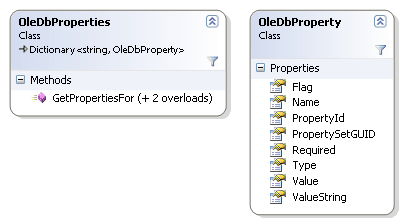
The Factory method requests data from property providers inherited from the PropertyProviderBase class. For component the following three object providers was implemented: OleDbCommand, OleDbConnection & OleDbDataReader:
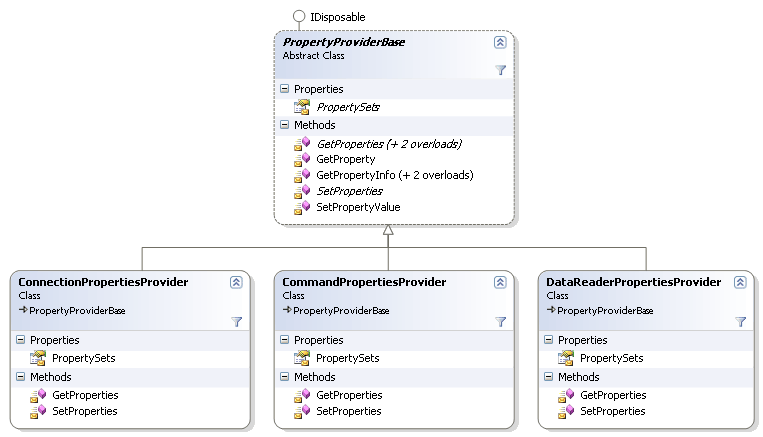
Each provider returns a set of OleDbProperties corresponding to OLE DB groups:
- OleDbConnection provider returns properties from Data Source Information, Data Source & Initialization sets.
- OleDbCommand and OleDbDataReader providers return Roweset group properties, the only difference is that you can set properties only for OleDbCommand and read only from OleDbDataReader.
Property groups members:
- Data Source Information
- Initialization — allowed IBProvider connection string properties.
- Rowset
Connection pool
Connection pool allows you to control the DB connection more efficiently. Each time when you call the OleDbConnection.Close() method, DB connection is automatically sended to this pool, where it’s kept open for while. The default connection hold time is 60 seconds.
So, when the client initiates a new DB connection, the provider first queries an opened connection from the pool, checking it against the case-sensitive ConnectionString property, and if such is not found, creates it.
The connection pool is configured through the Ole Db Services connection string property. arameter values are bit combinations of the following flags:
| Flag | Value. | OLE DB services |
|---|---|---|
| DBPROPVAL_OS_ENABLEALL | -1 | All services are enabled |
| DBPROPVAL_OS_RESOURCEPOOLING | 1 | Resources must be put into the pool |
| DBPROPVAL_OS_TXNENLISTMENT | 2 | If needed, sessions must be automatically connected to the global transaction |
| DBPROPVAL_OS_AGR_AFTERSESSION | 8 | Supporting the operation outside the session’s boundaries |
| DBPROPVAL_OS_CLIENTCURSOR | 4 | OLE DB Services level support of client cursors for providers which don’t support them. |
| DBPROPVAL_OS_DISABLEALL | 0 | All services are disabled |
In the article’s examples, OleDbServicesValues class contains enumeration for all of the above flags. If you want to use a combination of flags, you can use bit-by-bit enum excluding (& ~) for uncalled services from the DBPROPVAL_OS_ENABLEALL constant.
The following example runs performance testing for different OLE DB services:
public void OleDbServicesTest() { const int connection_count = 50; //storage for tests results Dictionary<string, double> timeResults = new Dictionary<string, double>(); OleDbConnectionStringBuilder builder = ConnectionProvider.GetConnectionStringBuilderFromUDL(); //OLE DB SERVISES = alss services are enabled builder.OleDbServices = OleDbServicesValues.EnableAll; timeResults.Add( String.Format(«OLE DB Services=EnableAll ({0})», builder.OleDbServices), DoConnections(builder, connection_count)); //OLE DB SERVISES = all services are disabled builder.OleDbServices = OleDbServicesValues.DisableAll; timeResults.Add( String.Format(«OLE DB Services=DisableAll ({0})», builder.OleDbServices), DoConnections(builder, connection_count)); //OLE DB SERVICES = all services are enabled exept client cursors //and supporting the operation outside the session’s boundaries builder.OleDbServices = (OleDbServicesValues.EnableAll & ~ OleDbServicesValues.ClientCursor & ~ OleDbServicesValues.AggregationAfterSession); timeResults.Add( String.Format(«OLE DB Services=\n»+ «\tEnableAll & \n» + «\t~ClientCursor & \n» + «\t~AggregationAfterSession ({0})», builder.OleDbServices), DoConnections(builder, connection_count)); foreach (string key in timeResults.Keys) Console.WriteLine(key + «. Seconds elapsed: « + timeResults[key]); } /// <summary> /// Opens many connections and start transactions /// </summary> /// <param name=»builder»></param> /// <param name=»cnt_connection»></param> /// <returns>execution time</returns> private double DoConnections(OleDbConnectionStringBuilder builder, int cnt_connection) { DateTime startTime = DateTime.Now; for (int i = 1; i <= cnt_connection; i++) { OleDbConnection con = new OleDbConnection(builder.ToString()); con.Open(); OleDbTransaction trans = con.BeginTransaction(); trans.Commit(); con.Close(); } return DateTime.Now.Subtract(startTime).TotalSeconds; } |
The most efficient solution will be using only resources pool and automatic transaction linking e.g. the OleDbServicesValues.EnableAll & ~OleDbServicesValues.ClientCursor &~ OleDbServicesValues.AggregationAfterSession bit mask («OLE DB Services =-13» parameter).
The performance will slow down a little bit, if you enable all OLE DB services, however disabling all services will drastically slowdown (about 20 times slower) overall performance.
Unconnected model. DataSet.
Filling of DataSet object
DataSet class serves for storing the database data in memory. Actually it is a set of multiple tables connected by the relationships, ideally it copies the primary database structure. It enables to minimize the number of database connections in a great way.
It is especially important for web-applications, for which the regular database connection is not optimal. It is also convenient to exchange data with Web-Service with the help of Data Set.
There are several methods of DataSet filling:
The first one appeared in Net Framework 1.0- it is the use of OleDbDataAdapter class:
public void FillDataSetFromDataAdapter() { // Description: fill DataSet via OleDbDataAdapter, connect Firebird, InterBase DataSet ds = new DataSet(); using (System.Transactions.TransactionScope scope = new System.Transactions.TransactionScope()) { OleDbConnection con = ConnectionProvider.CreateConnection(); con.Open(); OleDbDataAdapter adapter = new OleDbDataAdapter(«select * from EMPLOYEE», con); adapter.Fill(ds); Assert.IsTrue(ds.Tables[0].Rows.Count > 0); scope.Complete(); } } |
The second method appeared only in ADO .Net 2.0- it is the DataSet filling by means of OleDbDataReader:
public void FillDataSetFromDBReaderTest() { // Description: filling DataSet using OleDbDataReader, ADO .Net Firebird and InterBase components OleDbConnection con = ConnectionProvider.CreateConnection(); con.Open(); OleDbCommand cmd = new OleDbCommand(«select * from EMPLOYEE»,con, con.BeginTransaction()); DataSet ds = new DataSet(); DataTable tbl = ds.Tables.Add(«EMPLOYEE»); using (OleDbDataReader reader = cmd.ExecuteReader(CommandBehavior.CloseConnection)) { ds.Load(reader, LoadOption.OverwriteChanges, tbl); } } |
DataTableReader
This class enables to use DataTable object in one-directed ForwardOnly reading mode. As well as the OleDbDataReader it is inherited by basic DBDataReader class.
This DataSet tables reading mode may be useful when the general methods for unconnected data source and data formed by OleDbCommand.ExecuteReader() in connected mode is used.
The following example demonstrates the usage of general PrintDBDataReader() method for connected and unconnected mode of work:
public void GetDBReaderFromDataTable() { // Description: DataTableReader — forwaronly reards virtual table, ADO Net, InterBase and Firebird components DataSet ds = new DataSet(); DataTable tbl = ds.Tables.Add(«EMPLOYEE»); //loading dataSet OleDbConnection con = ConnectionProvider.CreateConnection(); con.Open(); OleDbTransaction trans = con.BeginTransaction(); ds.Load(new OleDbCommand( «select * from EMPLOYEE»,con,trans).ExecuteReader(), LoadOption.OverwriteChanges, tbl); //using forward only reading for DataTable this.PrintDBDataReader(new DataTableReader(tbl)); //OleDbDataReader and connected mode this.PrintDBDataReader( new OleDbCommand(«select * from EMPLOYEE», con, trans).ExecuteReader()); trans.Commit(); con.Close(); } /// <summary> /// Prints DBDataReader /// </summary> /// <param name=»reader»></param> public void PrintDBDataReader(System.Data.Common.DbDataReader reader) { while (reader.Read()) { Console.WriteLine(«*********************************»); for (int i = 0; i < reader.FieldCount; i++) Console.WriteLine(reader.GetName(i) + «=» + reader[i].ToString()); } reader.Close(); } |
Changes transfer back to database
As soon as we have changed the data in DataSet we need to transfer them back to database. For this purpose object OleDbDataAdapter has Update() mode. Before starting to use it, we have to setup our adaptor. Here OleDbCommandBuilder class will help us. It enables to generate the commands for inserting, updating and deleting operations as well as to create the matching collection of commands parameters.
Below you’ll see the example of changes transfer from DataSet to database:
public void UpdateDataSet() { // Description: OleDbDataAdapter.Update(DataTable) — store changes into Firebird and InterBase DBMS, c# DataSet ds = new DataSet(); DataTable tbl = ds.Tables.Add(«EMPLOYEE»); OleDbConnection con = ConnectionProvider.CreateConnection(); con.Open(); OleDbDataAdapter adapter = new OleDbDataAdapter(«select * from EMPLOYEE», con); adapter.SelectCommand.Transaction = con.BeginTransaction(); adapter.Fill(tbl); //change values in DataSet foreach (DataRow row in tbl.Rows) row[«FIRST_NAME»] = row[«FIRST_NAME»].ToString().ToUpper(); //build commands for update, insert и delete OleDbCommandBuilder cmd_builder = new OleDbCommandBuilder(adapter); adapter.DeleteCommand = cmd_builder.GetDeleteCommand(); adapter.UpdateCommand = cmd_builder.GetUpdateCommand(); adapter.InsertCommand = cmd_builder.GetInsertCommand(); //perform update adapter.Update(tbl); //rollback adapter.SelectCommand.Transaction.Rollback(); con.Close(); } |