


Working with Firebird and InterBase in Delphi. Part 1.
dbGo components
TADOConnection component
TADOTable component
TADODataSet component
Sending changes to database — updatable rowsets technology
Client and server cursors
What provider to choose?
TADOQuery component
SQL-queries with parameters
TADOStoredProc component
TADOCommand component
Transactions
Useful links
Download IBProvider Professional Edition
Introduction. Access to InterBase and Firebird from Delphi
There exist several means of working with InterBase and Firebird in Delphi. I know minimum 3 ways of accessing data via IBProvider:
- dbGo (ADO Express) components working via ADO library.
- Direct access to COM-interfaces of the ADO library bypassing dbGo components.
- Direct access to OLE DB COM-interfaces via third party VCL-components (OLE DB Direct/OLE DB Express).
dbGo components
dbGo are Borland VCL-components which allow regular way of working with ADO library from Delphi and C++ Builder for this development tool. Prior to Delphi 6 the components were called ADOExpress.
The appearance of dbGo components panel in Delphi (RAD Studio 2007):
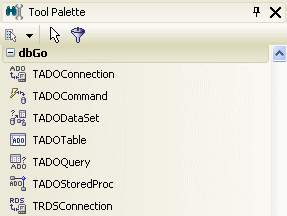
dbGo components include:
- TADOConnection component — connection to the database.
- TADODataSet component — basic data storage. TADODataSet allows loading data from tables, stored procedures and ad-hoc SQL queries and sending changes back to the database. An important condition is that the CommandText expression shall necessary return the dataset. TADODataSet corresponds to ADODB.Recordset object.
- TADOTable component is a simplified variant of TADODataSet. It allows to load whole tables in memory.
- TADOQuery and TADOStoredProc components are aimed at running ad-hoc SQL queries and stored procedures.
- TADOCommand component corresponds to ADODB.Command object. Actually, it combines the features of the three components: TADOTable, TADOQuery, TADOStoredProc.
Creating connection to the Firebird/InterBase database
TADOConnection component connects to the data storage. TADOConnection resembles TSQLConnection component. The difference between them is that when working with TSQLConnection connection parameters are set via ConnectionName, DriverName and Params properties. In TADOConnection all connection parameters are set via ConnectionString property. Moreover, it is possible to specify file name with connection parameters as a connection string in TADOConnection.
Special file type Microsoft Data Link exists to store connection parameters in Windows — it is a file with udl extension. Universal connection editor associates with this extension. IBProvider supports its own tabs that provide convenient interface for connection parameters forming. To use udl file in your application follow the next steps:
- Create an empty file with udl extension;
- Open the file (Enter) and the dialog related to the extension will appear for connection setting;
- Choose IBProvider v3 from the list of OleDb providers:
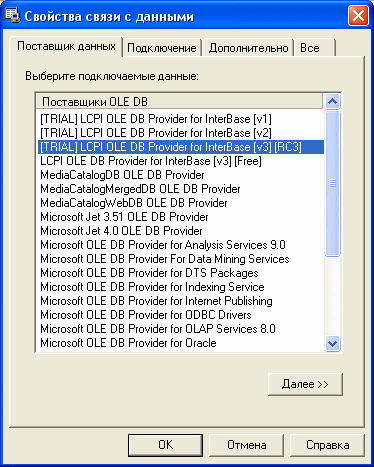
- Set database connection parameters and press “Test connection” button. The following parameters are set on the figure:
- Firebird 2.1 integrated authentication;
- Data Source — test database localhost:employee.fdb. The connection has been set without connection path as the database has been specified in aliases.conf file;
- Automatic transactions controlling mode: On;
- Encoding: WIN1251 or another suppoted Firebird and InterBase charset;
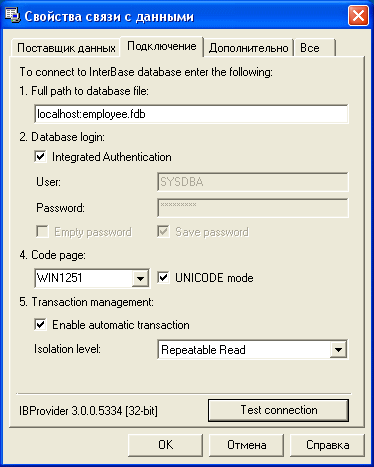
Always include the netname of the computer with Firebird or InterBase server installed into Location parameter. Use localhost for local connection. This will allow to provide compatibility.
Now add TADOConnection to the form. Set the property: Login Promt=false and specify previously created udl connection file as ConnectionString:
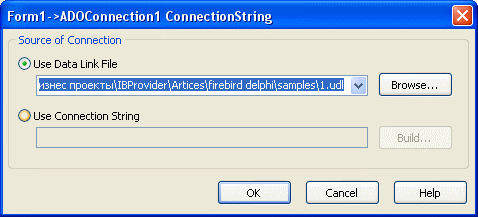
Detailed information on IBProvider initialization properties page.
Data display via TADOTable
TADOTable component allows loading data from single table.
- Set TADOConnection object:
- Connected = true;
- Login Promt = false;
- Add TADOTable to the form and make the following settings:
- Connection = ADOConnection1;
- TableName = name of the table from employee.fdb (CUSTOMER, EMPLOYEE, PROJECT и т.п.);
- Active=true;
- Add TDataSource component from Data Access tab. Settings:
- DataSet = TADOTable1;
- Add TDBGrid component from Data Access tab. Settings:
- DataSource = DataSource1;
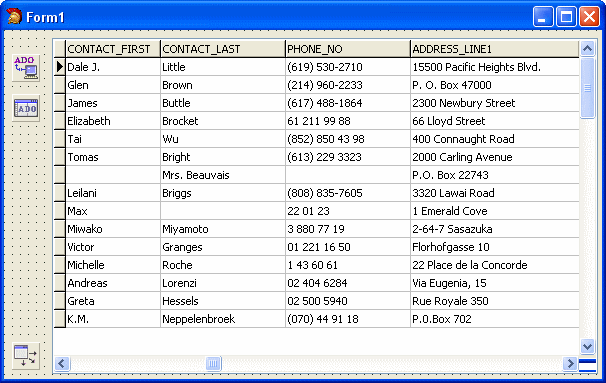
As a result DBGrid will display data from the table chosen in TADOTable object:
TADODataSet component
TADODataSet component is the add-in to ADODB.Recordset object. Prior to start working with TADODataSet set the property Connection = ADOConnection1. An alternative variant is to set connection string in ConnectionString property. But I strongly recommend to use separate TADOConnection object for connection storage.
Enter the text of data loading command in CommandText property. The command text may be:
- SQL query. (Examples: «SELECT * FROM EMPLOYEE», «EXEC ALL_LANGS», etc.). In this case CommandType=cmdText.
- Table name. (Examples: «EMPLOYEE», «CUSTOMER», «PROJECT»). CommandType=cmdTableDirect.
- The name of a stored procedure. (Example: «ALL_LANGS», «SHOW_LANGS»). CommandType=cmdStoredProc.
A command in CommandText shall return the recordset. For example, you can not use INSERT, DELETE or UPDATE and stored procedures that do not return the recordset in the text.
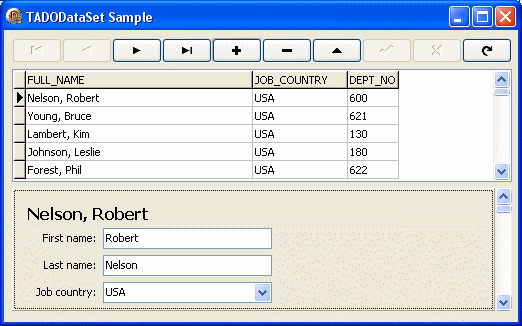
Let’s pass to the practical example demonstrating Delphi abilities when working with Firebird/InterBase:
- Let’s create the easiest editor of employees based on TADODataSet.
- We will navigate through records via TDBNavigator component.
- The list of employees will be displayed in TDBGrid.
- To edit details we will use TDBCtrlGrid container placing TDBLabel, TDBText and TDBComboBox into it.
The finished example is shown on the figure:
The following is the sequence of actions to reproduce the example by your own:
- Add TADOConnection component to the form and set up InterBase/Firebird connection.
- Add TADODataSet component and set it in the following way:
- CommandText = «select EMP_NO, FIRST_NAME, LAST_NAME, FULL_NAME, JOB_COUNTRY, DEPT_NO from EMPLOYEE»;
- CommandType = cmdText;
- Active = true;
- Add TDataSource component from Data Access tab:
- Set DataSet = ADODataSet1;
- Add 2 components from Data Controls tab to the form: TDBNavigator and TDBCtrlGrid:
- Set DataSource = DataSource1 for each of them;
- Set RowСount = 1 for TDBCtrlGrid;
TDBCtrlGrid — is a container component. It can display both one and several records depending on RowCount property value. It contains components for data editing.
TDBLabel — is a readonly field. We will use this component to display FULL_NAME column.
To edit FIRST_NAME, LAST_NAME fields we add 2 TDBText components to the form and set DataField property for them.
JOB_COUNTRY field has FOREIGN KEY on COUNTRY table. To edit this field we use drop-down list TDBComboBox containing country codes. After setting DataField = JOB_COUNTRY you shall fill in the list with data from the table COUNTRY.
In addition to those described in the example Data Controls tab contains components for image editing (TDBImage), multi-page text (TDBMemo), lists displaying, etc.
Sending changes to database — updatable rowsets technology
IBProvider supports a wonderful OLE DB option — updatable rowsets technology. In the above example this technology allowed not to specify the logic of the changes sending back to the database in the code. All the changes were send automatically via updatable rowsets. Currently only IBProvider v2 supports updatable rowsets technology. Please, take it into account when choosing a provider for connection.
Client and server cursors
IBProvider uses cursors to navigate through records. Cursors can be server or client ones.
Client cursor is stored on the client’s side. After running a query the whole resulting set is loaded to ram-memory or driver swap-file. It can cause delays at large volume data transfers, especially via the LAN. In dbGo client cursor is used by default. It provides an advantage of quick operation when working with small data volumes. All the three providers from IBPRovider Professional Edition can work with client cursors.
Server cursor is used when working with large data sets that are disadvantageous to be sent to clients in full. So the cursor is returned to the client immediately after query running and data is read on as-needed basis. In addition, IBProvider implementation allows to read BLOB-fields on as-applied basis instead of receiving the whole record. It also raises production efficiency when one entry contains several BLOB-columns with large data. In the current implementation server cursor can be used only with IBProvider v1, as it is the only one supporting 4-byte bookmarks used in dbGo for working in server cursor mode. The later IBProvider versions already use 8-byte bookmarks.
Cursor type is specified in CursorLocation property. It can have values clUseServer or clUseClient.
What provider to choose?
IBProvider Professional includes three OLE DB providers with different opportunities for developers.
IBProvider v1 allows working with dbGo components in server cursor mode. This is because of the limited bookmark size in dbGo = 4 bytes. We have already planned to make IBProvider v3 compatible with dbGo server cursors in Delphi and C++ Builder. As soon as it is implemented, IBProvider v1 will become history. To use the provider specify Provider=LCPI.IBProvider.1 in the connection string.
IBProvider v2 supports updatable rowsets technology. They allow to transfer changes back to the database without explicit entering of insert/delete/update command texts. The provider generates SQL-commands individually based on select-expressions. This technology usage example can be seen above. To use the provider specify Provider=LCPI.IBProvider.2 in the connection string. Our near-term plans include implementation of updatable rowsets support in IBProvider v3.
IBProvider v3 is the most up-to-date and productive provider. It has the unique set of technologies, supports all code pages, special options of the latest versions of Firebird and InterBase servers, 64-bit operating systems and many other useful functions. If you do not plan to use updatable rowsets or server cursor choose IBProvider v3 without doubts. To do this specify Provider=LCPI.IBProvider.3 or Provider=LCPI.IBProvider in the connection string.
If you need to use the opportunities of all three drivers in one application, I recommend you, as a temperate solution, to use three identical connections to the database with different drivers. For instance, to do all the basic operations via IBProvider v3, updatable rowsets via IBProvider v2, to cache data via sever cursors with IBProvider v1. After we have updatable sets and dbGo server cursors support available in IBProvider v3 you will be able to leave only one connection.
TADOQuery component
TADOQuery component is aimed at execution of SQL-commands. It can be considered as an analog of TSQLQuery component from dbExpress. Connection to the database is set via Connection or ConnectionString properties. Query text is written to SQL property. If a query returns the dataset one should use Open() method or Active=true property. If a query does not return the dataset, it shall be run using ExecSQL method. ExecSQL returns the number of records processed during a query running. The same value is contained in RowsAffected property.
SQL-queries with parameters
Queries can have parameters. Using command parameters one may set conditions and pass data to the database server. There are two types of parameters: named and positional. By default all named parameters in IBProvider are set via a semicolon (:), positional ones via a question mark (?).
To demonstrate the work of TADOQuery component we will write an example in which three variants of its application can be seen:
- Running of queries with named parameters. ExecSQL и RowsAffected.
- Running of queries with positional parameters. ExecSQL and RowsAffected.
- Running of queries returning a rowset. Open() method or Active property.
The finished example is shown on the figure. TADOQuery component is used for rowset selection and insert/delete operations performing:
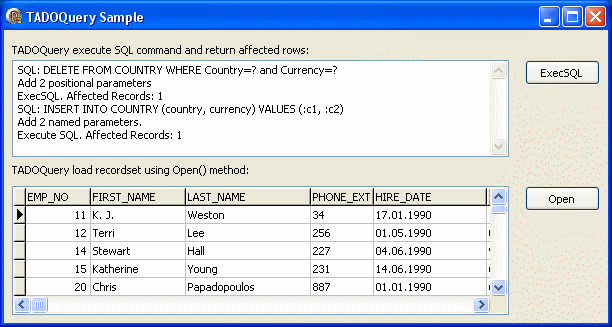
Components on the form are connected in the following way: TADOQuery requests data from the database specified in TADOConnection and transfers it to TDataSource intermediary component. TDBGrid is able to display data loaded into TDataSource. The following interaction scheme appears: ADOConnection->ADOQuery->DataSource (Data Access tab)->DBGrid
Let’s study the first variant of TADOQuery usage — running of queries that do not return resulting rowset:
// catch all exceptions during data access to Firebird/InterBase from Delphi
try
  // open Delphi Firebird connection
  ADOConnection1.Open();
  ADOConnection1.BeginTrans();

  // positional parameters
  with ADOQuery1 do
    begin
        // query text
        with SQL do begin
          Clear;
          Add('DELETE FROM COUNTRY WHERE Country=? and Currency=?');
        end;

        with Parameters do begin
             Clear;
             // way 1
             AddParameter().Value :='Turkey';
             // way 2
             AddParameter();
             Items[1].Value :='Lira';
        end;

        // insert one record
        ExecSQL();
        Memo1.Lines.Add ('ExecSQL. Affected Records: ' + IntToStr(ADOQuery1.RowsAffected));
  end;

  // named parameters
  with ADOQuery1 do
    begin
        with SQL do begin
          Clear;
          Add('INSERT INTO COUNTRY (country, currency) VALUES (:c1, :c2)');
        end;

        // set up 2 parameters
        Parameters.ParamValues['c1;c2'] := VarArrayOf (['Turkey', 'Lira']);

        ExecSQL();
        Memo1.Lines.Add ('ExecSQL. Affected Records: ' + IntToStr(ADOQuery1.RowsAffected));
    end;

    ADOConnection1.CommitTrans();
  except on E : Exception do
    // roll back transaction if errors occured
    begin
      ADOConnection1.RollbackTrans();
      ShowMessage(E.ClassName+' db error: '+E.Message);
    end;
  end;

  // close the connection
  ADOConnection1.Close();
In the above example command parameters are set by two different ways:
1. By one expression at a time:
ADOQuery1.Parameters.ParamValues['c1;c2'] := VarArrayOf (['Turkey', 'Lira']);
2. And each parameter separately:
with Parameters do begin
     Clear;
     AddParameter().Value :='Turkey';
     AddParameter();
     Items[1].Value :='Lira';
end;
To select data via TADOQuery SQL expression is used which contains SELECT command and Open() method:
try

// open Delphi InterBase connection
ADOConnection1.Open();
ADOConnection1.BeginTrans();

  with ADOQuery1 do
   begin
     // SQL query text
     with SQL do begin
        Clear;
        Add('SELECT * FROM EMPLOYEE WHERE EMP_NO > ?');
     end;

     with Parameters do begin
        Clear;
        AddParameter().Value :='10';
     end;

     // using Open method to retrive recordset.
     // you can set Active=true instead
     Open();
   end;

ADOConnection1.CommitTrans();

except on E : Exception do
 // rollback transaction if errors occured
 begin
    ADOConnection1.RollbackTrans();
    ShowMessage(E.ClassName+' db error: '+E.Message);
 end;

ADOConnection1.Close();
TADOStoredProc
TADOStoredProc component allows execution of Firebird and InterBase stored procedures. TADOStoredProc work principle is the same as that of TADOQuery:
- Connection is specified in Connection or ConnectionString property.
- Open() method or Active=true property allow to obtain resulting rowset.
- ExecSQL method allows to execute the procedure and return the result in the set of OUT parameters.
The only difference is ProcedureName property in which the name of stored procedure is defined. SQL property is absent in TADOStoredProc component.
Stored procedure can return the result in two ways:
- as a resulting rowset;
- as OUT-parameters;
To obtain resulting rowset SELECT operator is used:
select * from stored_procedure_name(…)
To execute the procedure that does not return anything or returns OUT-parameters the exec instruction shall be used:
exec procedure stored_procedure_name
TADOCommand component
TADOCommand is the command send to server to read or change data. Actually, the component unites the abilities of 3 components studied: TADOTable, TADOQuery, TADOStoredProc.
TADOCommand behavior changes depending on CommandType property. It can take the following values:
- cmdText — command text contains a SQL query. The behavior is analogous to that of TADOQuery.
- cmdStoredProc — CommandText property contains stored procedure name. The behavior corresponds to TADOStoredProc component.
- cmdTable and cmdTableDirect mean that text contains the name of the table that shall be loaded. cmdTable and cmdTableDirect meanings are identical for Firebird and InterBase. They correspond to TADOTable.
Working with transactions
Transactions controlling mechanisms in IBProvider are the same for all development tools. I described the transactions earlier in the first part of InterBase and Firebird Developer’s manual for Visual Studio .Net. I recommend you to pay attention to the following chapters of it:
- Controlling transactions automatically;
- Transaction isolation levels;
- Savepoints;
- Commit Retain, Rollback Retain and Firebird.
Useful links
- Examples of working with Firebird and InterBase from Delphi without dbGo via ADO COM-objects.
- Firebird download.