


Start working with InterBase Sql Server using IBProvider database client
Versioning architecture of InterBase SQL Server
InterBase server advantages
InterBase SQL language
InterBase server current version
InterBase SMP 2009 Developer Edition
InterBase SMP 2009 ToGo
InterBase productivity
InterBase versus Firebird
Start working with InterBase
New InterBase database creation
InterBase Server security
SYSDBA User. Changing default password
Connection to InterBase from client’s application
InterBase and VBScript, Visual Basic, VBA
InterBase and Delphi
InterBase and .Net
InterBase and C++
InterBase and 64 bits
InterBase database editing — creation of tables, connections, and keys
Creation of InterBase tables using IBConsole
Creation of InterBase tables using isql.exe utility
The List of InterBase administration utilities
What is InterBase Server?
InterBase SQL Server — is a databases management system originally developed by Borland Company. Now the developer of InterBase – Embarcadero Company.
Versioning architecture of InterBase SQL Server
InterBase database is based on versioning data storage architecture. This approach has a number of advantages over locking DBMSs:
- There is no need to support transaction log after a system failure to restore InterBase databases.
- Clients who read data never block clients who record data.
InterBase server advantages
InterBase Server — is a cross-platform DBMS, which supports the majority of known platforms: Windows, Linux, Unix, Solaris, Mac OS, etc.
InterBase has a number of advantages over other DBMSs:
- Updatable Views;
- Two-phase commit;
- Efficient trigger mechanism;
- Server processing of BLOB fields (BLOB filters);
- Events (notifications);
- Encryption of network traffic, databases, backup files, and individual database columns.
InterBase SQL language
InterBase SQL language is compatible with SQL-92 standard. Moreover, InterBase server supports extensions of SQL language standard subset via user defined functions (UDF). InterBase SQL provides advanced SQL capabilities for stored procedures and triggers — PSQL.
InterBase server current version
Currently the newest version is InterBase 2009.
InterBase 2009 Server is available in 4 variants:
- InterBase SMP 2009 Developer;
- InterBase SMP 2009 Server;
- InterBase SMP 2009 Desktop;
- InterBase SMP 2009 ToGo.
InterBase SMP 2009 Developer Edition
InterBase SMP Developer Edition is delivered free as a part of CodeGear integrated development environment; we recommend to use it for the first acquaintance.
InterBase SMP 2009 ToGo
InterBase SMP 2009 ToGo single-user version is embedded into application as a dll; it is aimed at development of portable applications with database size less than 3 megabytes. Meanwhile, it has all the necessary functions of a full-fledged database including transactions and SQL support.
You can download various InterBase versions here: InterBase download.
InterBase productivity
InterBase Server was developed taking into account modern requirements to DBMS productivity. A number of technologies have been applied in the latest versions of InterBase SQL Server to increase substantially DBMS operation speed:
- Support of InterBase SMP (symmetric multiprocessing) allows to use the capabilities of multiprocessor architecture with single server process of InterBase SuperServer.
- Hyperthreading technology support.
- Batch processing of SQL queries allows to reduce network traffic and to raise productivity.
InterBase versus Firebird
Though InterBase 2009 and Firebird 2.5 are based on the common source code InterBase 6.0, these DBMSs are very different from each other on the modern development stage.
InterBase 2009 has implemented the following options, which are not supported in the latest version Firebird 2.5:
- Database and individual columns encryption;
- Network traffic encryption (Over-the-Wire (OTW) Encryption);
- Journaling of operations;
- Possibility of authentication on the database level;
- Dump export in on-line mode;
- Point-in-Time Recovery;
- Boolean logical data type.
Client-server version of Firebird SQL Server exists in two variants: Firebird Super Server and Firebird Classic. InterBase has implemented the architecture that unites the advantages of Classic and SuperServer — InterBase SuperServer + SMP.
Super Server architecture — all client’s connections are served by the single server process, there exists common client’s cache. This allows lower consumption of resources for clients serving. Super Server disadvantage is inability to involve several processors for server operation.
Classic Server Architecture creates individual server process for each client’s connection. Classic Server architecture is more reliable, as failure in one server process doesn’t cause rejection to serve all the clients. Moreover, Classic Server allows distribution of client’s connections between several processors. The architecture disadvantage is additional overheads for serving and synchronization of processes and the absence of common client’s cache.
InterBase Super Server + SMP (symmetric multiprocessing) unites the advantages of two architectures — Classic и Superserver. Single server process of InterBase Super Server allows to reduce overheads and to use common client’s cache; SMP technology involves the potential of multiprocessor architecture, which was earlier unavailable for Classic Server.
Start working with InterBase
You may use test database employee.gdb to familiarize with InterBase. It is included into installation kit and is located in the folder C:\CodeGear\InterBase\examples\database\.
New InterBase database creation
A new database can be created via management console IBConsole. It is located in the folder C:\CodeGear\InterBase\bin:
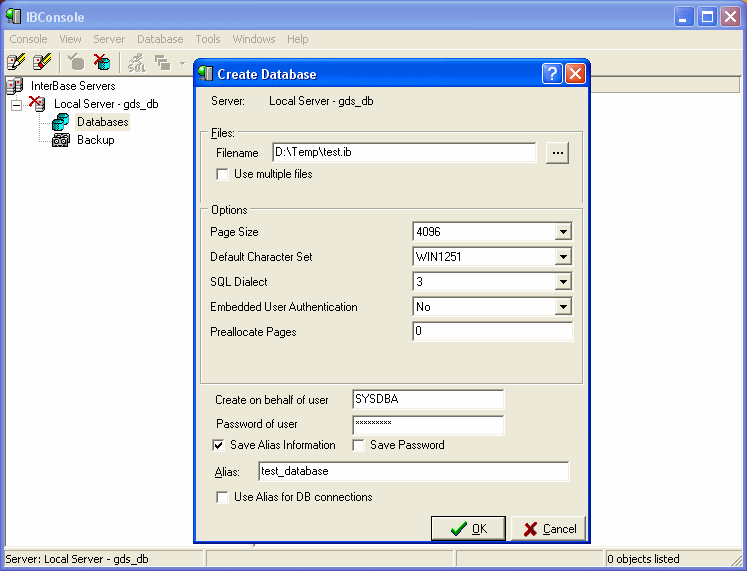
The alternate way is using isql utility:
- start the utility: C:\CodeGear\InterBase\bin\isql.exe
- perform database creation instruction:
In ISQL each expression ends with semicolon.
Connection can be tested by running the query:
SQL> select TMP$DATABASE_PATH from TMP$DATABASE;
If everything has been done in the right way it will return the path to the connected database:
========================================================================== D:\TEMP\TEST.GDB
InterBase Server security
InterBase SQL Server supports several user authentication methods:
- Classic Authentication Scheme — users and passwords are common for all the bases and are stored in InterBase system database — admin.ib (isc4.gdb).
- Embedded User Authentication — users and passwords are stored in the client’s database. Such a scheme protects databases from direct copying of client’s database or substitution of admin.ib on server.
To enable Embedded User Authentication, select WITH ADMIN OPTION when creating a database via SQL. You can simply set the appropriate parameter in database settings in IBConsole.
The following instructions allow to control Embedded User Authentication mechanism:
ALTER DATABASE ADD ADMIN OPTION
ALTER DATABASE SET ADMIN OPTION INACTIVE
ALTER DATABASE SET ADMIN OPTION ACTIVE
After enabling the storage of users in a database, you can manage users via SQL operators:
CREATE USER EMPLOYER SET PASSWORD 'PASSWORD';
ALTER USER EMPLOYER SET NO LAST NAME, DEFAULT ROLE ABC;
Both authentication schemes, Classic and EUA, can be used on InterBase server simultaneously. You can read about authentication in detail in the article:
SYSDBA User. Changing default password
SYSDBA is administrative InterBase user with exclusive rights. Default SYSDBA password is masterkey. To change password use gsec utility from InterBase:
C:\CodeGear\InterBase\bin>gsec GSEC> modify SYSDBA -pw NEW_PASSWith gsec utility you may create, delete, modify and view users. You may get the full list of commands by typing help.
Connection to InterBase from client’s application
First download and install the package of IBProvider Professional Edition.
IBProvider Professional Edition is the set of COM-components that allows working with any version of Firebird and InterBase. The components are supported by most development tools: Delphi, C++ Builder, Visual C++, .Net Framework, C#, Visual Basic, VBScript, VBA and others.
Let’s write simple VBScript to check connection to InterBase. Create empty vbs file and paste the following code into it stating the right path to the database:
Dim cn, cmd, rs, i
Set cn = CreateObject ("ADODB.Connection")

cn.Open "Provider=LCPI.IBProvider.3;" & _
	    "Data Source=localhost:d:\temp\test.gdb; " & _
	    "User Id=SYSDBA;" & _
	    "password=masterkey;" & _
	    "ctype=win1251;" & _
	    "auto_commit=true"

set rs = cn.execute("select * from TMP$ATTACHMENTS")

do while not rs.EOF

   for i=0 to rs.Fields.Count - 1
       wscript.echo rs(i).Name & "=" & rs(i).Value
   next

   rs.MoveNext
loop

rs.close
cn.close
Run the script in the command line to see the list of active connections to the database.
InterBase и VBScript, Visual Basic, VBA
For the access to InterBase from VBScript, VBA, Visual Basic, ADO library is used (ActiveX Data Objects). You will find a lot of examples of working with the library in the documentation: examples of InterBase VBScript, VBA, Visual Basic.
InterBase and Delphi
IBProvider offers several means of working with InterBase from Delphi:
- dbGo (ADO Express) components working via ADO library.
- Direct access to COM-interfaces of ADO bypassing dbGo components.
- Direct access to COM-interfaces of OLE DB using external VCL-component (OLE DB Direct/OLE DB Express).
InterBase Delphi Examples: InterBase Delphi.
InterBase and .Net
To access InterBase from .Net ADO .Net library is used. IBProvider site contains large step-by-step manual dedicated to working with Firebird in Visual Studio .Net (ADO .Net).
Additional materials to the topic: Examples of working with ADO .Net for beginners.
InterBase and C++
IBProvider Professional Edition includes C++ library for working with OLE DB providers. It is the fastest means of working with OLE DB providers from Visual C++ 2005-2008 and from C++ Builder.
InterBase database editing — creation of tables, connections, and keys
You need to create tables, connections between tables, primary keys, indexes, stored procedures, generators, and other objects in an empty database. You can use InterBase inbuilt features — IBConsole or isql.exe utility — to edit databases.
Creation of InterBase tables using IBConsole
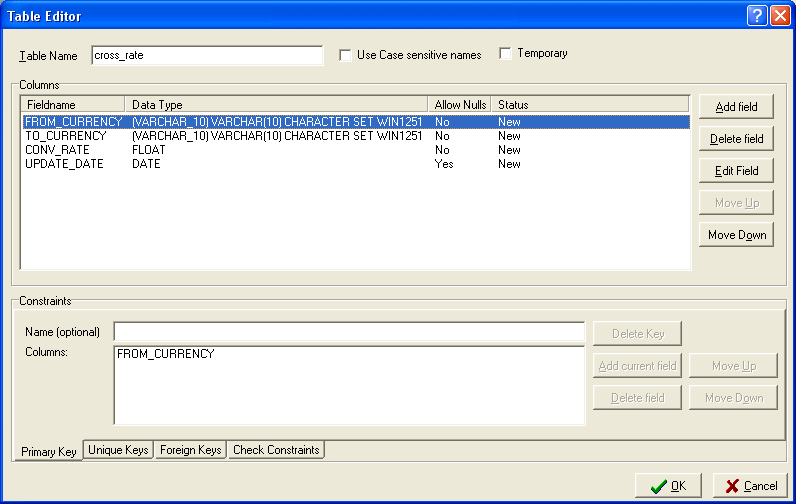
Creation of InterBase tables using isql.exe
Create the table:
SQL> CREATE TABLE cross_rate CON> ( CON> from_currency VARCHAR(10) NOT NULL, CON> to_currency VARCHAR(10) NOT NULL, CON> conv_rate FLOAT NOT NULL, CON> update_date DATE, CON> CON> PRIMARY KEY (from_currency, to_currency) CON> );Than paste one entry and select from the table:
SQL> INSERT INTO cross_rate VALUES (‘Dollar’, ‘CdnDlr’, 1.3273, ’11/22/93′); SQL> SELECT * from cross_rate; FROM_CURRENCY TO_CURRENCY CONV_RATE UPDATE_DATE ============= =========== ============== =========== Dollar CdnDlr 1.3273000 1993-11-22There are many graphic utilities of InterBase administration other than isql.
The List of InterBase Administration Utilities
IBExpert
IBExpert — Supports Firebird, InterBase, Yaffil. DDL and DML editors, visual query builder, code auto completion, Metadata Extractor, and many other capabilities.License: from 179 euro.
www:
IB/FB Development Studio
IB/FB Development Studio — Supports Firebird, InterBase. Visual database designer, embedded MERGE, scheduler, code auto completion, query analyzer, performance monitor.License: from 149 euro.
www:
Blaze Top
Blaze Top — Supports Firebird, InterBase. Developer and database administrator tool.License: from 129 euro.
www:
Database Workbench
Database Workbench — Supports several database servers including Firebird and InterBase. Stored procedures debugging, analysis of plans, embedded data mining and metadata transfer.Licensed separately for InterBase and Firebird. 171$ for each engine (InterBase or Firebird).
www:
If your utility is absent in the above list, please write us at ibprovider.com and we will add its description.
Article tags: InterBase Server, InterBase SQL language, InterBase database, InterBase 2009, InterBase 2007, InterBase vs Firebird, Firebird 2.5, InterBase tables, IBExpert, IB/FB Development Studio, Blaze Top, Database Workbench.